
Before You Begin:
- Ensure you have Admin Access. Only Admins In AutoTrainer are able to create Assignments. Please reach out to AutoTrainer Support at support@autotrainer.com to check your access.
Creating a New Assignment
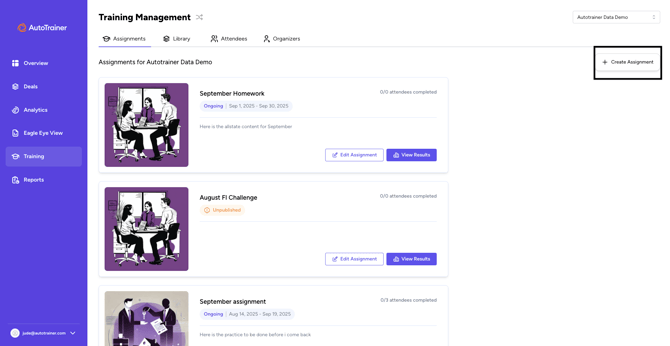
- Click on Training on the left hand side of your AutoTrainer Home screen
- Click on Create Assignment on the Right hand side of the page
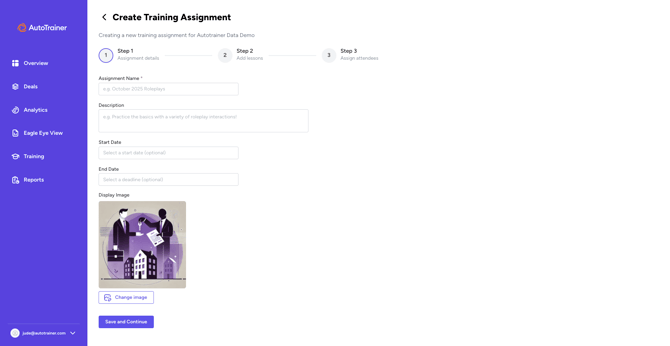
- Name your Assignment. Here it can be for a group of people, or for an individual Team member. Eg: "August Roleplay Challenge"
- Put an optional description. You can also select a time frame in which that assignment needs to be due.
- Click Save and Continue
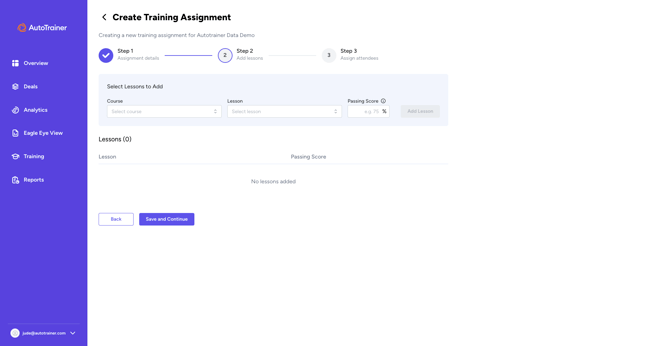
- On the next page, you can select the Courses and specific lessons that you would like done. You can also select minimum passing Scores.
- Once you select a Lesson and set the score, press Add Lesson. Add as many as you would like. Then click Save and Continue.
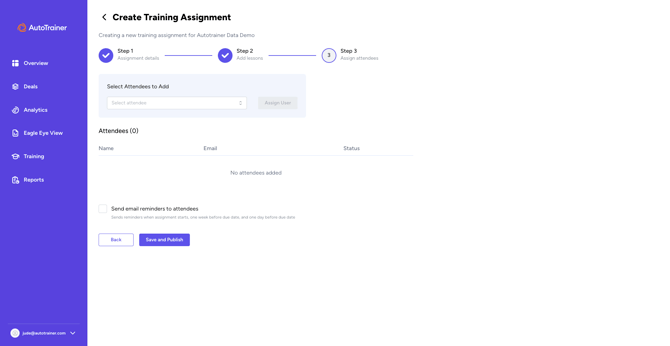
- Next page, invite anyone on your team that you would like to be included in this assignment. Select their name from the drop down box, then click Assign User.
- Once all the Attendees are assigned, click the Send email reminders to Attendees box, This will remind them periodically that that need to complete the assignments, so you don't have to.
- Click Save and Publish.
How Do I Edit An Assignment After It Has Been Published?
- Click On Edit Assigment on the Assignment would you like to make changes to
- On The first page, you can make any changes to the title or description. Hit Save and Continue to go to the next page
- To Delete a course click the Red Trash Can, to preview what the course is, click the square with the arrow at the top right. You can also add courses in this step as well.
- Once you are done making your changes, hit Save and Continue.
- On the next page, you can add additional Attendees, or delete Attendees already added.
- Hit Save and Continue to complete your changes.
Related: Coaching, Training, Roleplay